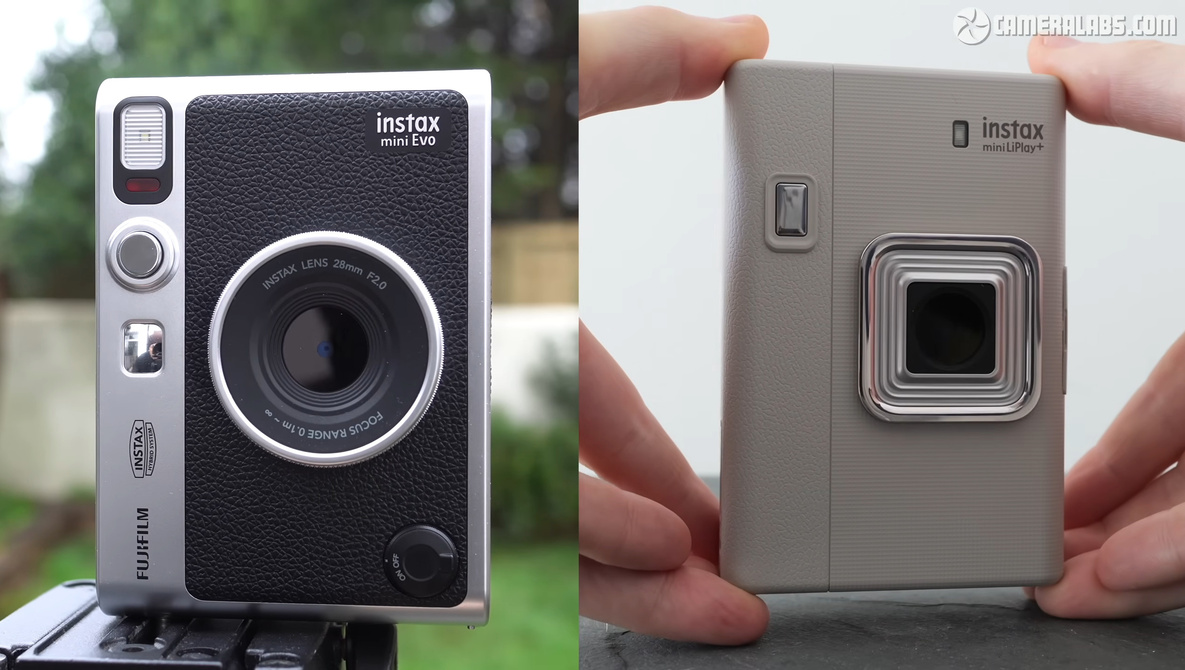
Instant cameras live or die on small design choices, and the instax mini Evo and instax mini LiPlay+ put almost all of those decisions in different places. You get the same prints and similar prices, so the real question is how you want to shoot, share, and handle your camera.
Coming to you from Gordon Laing, this thoughtful video walks through how similar these two Instax Minis are under the hood. Both use a 5-megapixel 1/5-inch sensor paired with a 28mm f/2 lens, so the basic image quality and field of view line up whether you are shooting parties, travel, or everyday snapshots. Each one stores around 45 shots internally and adds microSD support if you want to treat the camera like a tiny digital archive instead of a disposable box. Both print on Instax mini film at roughly the same cost per frame, so you are not gambling with running costs when you pick one over the other. The video spends time showing real prints side by side so you can see how little separates them once the image is on paper rather than just on the screen.
Laing then shifts to where the decision actually happens: design and handling. The instax mini Evo leans into a classic rangefinder look with physical dials and a print lever that feels closer to a vintage film camera. The instax mini LiPlay+ goes more modern, with smoother lines and a cleaner, slightly art deco style that feels like a gadget rather than a toy. You get a sharper rear screen on the LiPlay+, while the Evo counters with a tripod thread and a cold shoe if you want to add a small LED light or mount something like a microphone grip. The port situation also tilts toward the LiPlay+, which uses USB-C instead of the Evo’s older micro USB connection, and that alone might sway you if you hate carrying an extra cable.
Selfies and creative effects are where Laing shows the clearest split in personality between the two cameras. The Evo sticks with a simple mirror next to the lens so you can roughly line up your face, and it focuses more on in-camera looks with a grid of lens and film effects you control from physical dials. The LiPlay+ adds a dedicated selfie camera on the back, so you can hold it like your phone and compose more precise group shots without guesswork. Its filters are fewer, but you also get playful frames and graphics that sit on top of the image and are much easier to align when you can see yourself on the rear screen. Laing also walks through the LiPlay+ audio-enabled QR code prints and how they add a layer of sound and motion to what would normally be a silent instant shot, which changes how you might use the camera at events or on trips.
If you care more about having an instant camera at all than about these small feature differences, Laing does not stop at these two hybrids. For a simple gift or a first step into Instax, something like the fully analog instax mini 12 or instax mini 41 will keep things under the three-figure mark and skip menus entirely. If you are already happy shooting with a phone and mostly want prints, a dedicated instax mini printer, instax square printer, or instax wide printer might make more sense than carrying another camera at all. The video gives you a clearer feel for where the Evo’s tactile controls beat the LiPlay+ convenience features, and where the LiPlay+ selfie setup and QR tricks pull ahead if you are more social or phone-centric in how you share images. Check out the video above for the full rundown from Laing.