AI models in Photoshop are starting to do something that used to take hours of careful cloning and healing: bring cracked, faded family photos back to life while still looking real. Those images are often the only visual record of parents, grandparents, and whole branches of a family, and AI is starting to emerge as a legitimate option.
Coming to you from Anthony Morganti, this practical video walks through using the Gemini 3 model with Nano Banana Pro inside Photoshop’s Generative Fill to rebuild old prints with a single prompt. Morganti shows you how to select the entire frame, open Generative Fill from the contextual taskbar, and swap from Adobe’s Firefly models over to the partner options so Gemini 3 is actually driving the edit. Instead of stacking up a complicated prompt, he keeps it tight with “repair, restore, and remove yellow color cast,” which is about as simple as you can get while still telling the model what to do. You see the tradeoff of using partner models compared to Firefly, since you get only one variation per run and need to regenerate if you do not like the first attempt. The key takeaway is that the faces in his examples stay recognizable, which is where many other AI “restoration” tools go wrong.
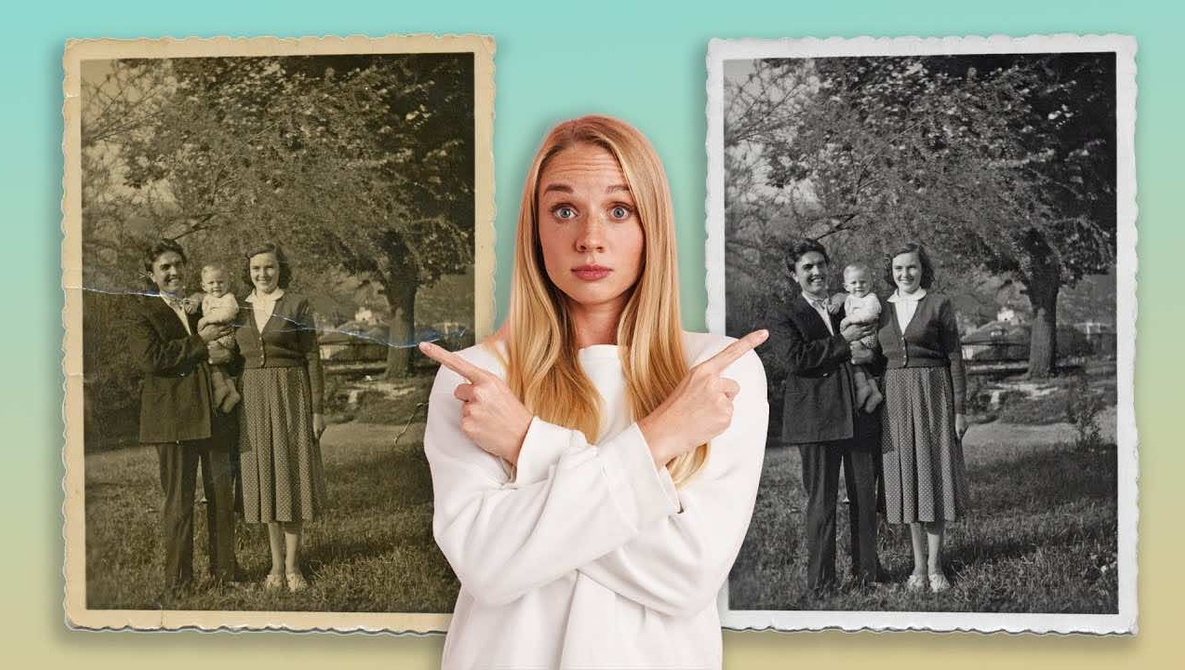
The video also shows how sensitive these models are to small changes in the prompt, especially when it comes to color. Morganti runs the same damaged print twice, first letting Gemini 3 remove the yellow cast and then repeating the process with a trimmed prompt so the sepia tone stays in place. The side-by-side comparison is simple, but it clearly shows how much the overall mood of the image shifts when you neutralize that old paper stain. He pushes further by asking the model to “repair, restore, and colorize,” and that is where the warning lights start to flash a bit. Hats change, costume details shift, and even the dog in one frame starts to drift from the original look, which is a problem if you care about historical accuracy more than stylistic flair. You come away understanding that restoration and colorization are two very different levels of intervention.
Later in the video, Morganti tests the same approach on a badly faded color photo and then on a genuinely personal image from his own family taken around the end of World War II. Gemini 3 with Nano Banana Pro cleans up scratches, stabilizes tones, and even removes pen circles around certain people without any special masking. At the same time, it exposes its limits in a very honest way. Keep your expectations grounded so you see this as a strong first pass, not a magic fix for every problem in an archival print. You also get a feel for when to accept a slightly imperfect but faithful restore and when to drop back into manual retouching to finish the job. Check out the video above for the full rundown from Morganti.